
Access database viewer · Android
Open the Access file someone sent you. Read it on your phone.
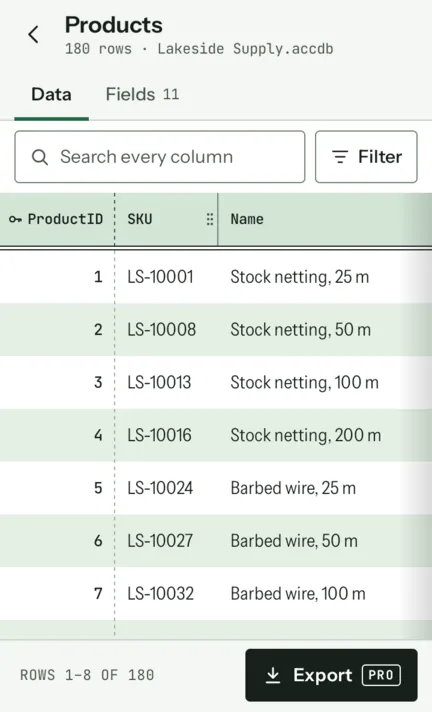
Keyfield is an Access database viewer for Android. Tap an ACCDB or MDB file in your email, Drive or Files, and every table is there with its row count, in a grid that is actually comfortable on a phone. Access 97 to Access 2019. Offline, no account, no ads.
 Viewing is free · no limit on files or rows
Read it like a table
A grid made for following one row across
Access tables are wider than a phone. Keyfield bands every other row like greenbar paper, keeps the key column pinned at the start, and lets you drag any column wider.
- Search every column at once, add filters in plain words, sort by any column.
- Tap a row to read it as a form, every field on its own line.
- Big tables stay quick: rows are read page by page, not loaded all at once.
- On a tablet in landscape, the table list sits beside the open table.
See what the database knows
A viewer that stops at the tables tells you half the story. Keyfield also shows the saved queries as SQL, the relationships between tables, and every field with its type, so you can understand a database someone else built. Reading a query.
Opens the file, not your whole phone
Open from any app’s “Open with”, or pick the file with Android’s own picker. Keyfield copies that one file into its private storage and reads it there. It never asks for access to all your files.
Take the data with you
Keyfield Pro, one purchase with no subscription, exports a table or just the rows you filtered to Excel, CSV or PDF, saves the files stored in attachment fields, opens Access 2007 password files, and shares any export. Exporting to Excel.
The whole story, plainly
What it opens, what is free, and what it is not
Keyfield is a reader. It is better to know that before you install it than after.
- Opens
.accdband.mdbfiles from Access 97 to Access 2019. An.mdbwith a database password opens too, free.- Free
- Opening and reading: every table, every row, search, filters, sorting, the row form, queries as SQL, relationships and field types. No limit on files or rows.
- Keyfield Pro
- A one-time purchase: export to Excel, CSV or PDF (PDF prints the first 2,000 rows), save attachment files, open Access 2007 password files, share exports.
- Read-only
- Nothing in the file is changed. There is no editing.
- Queries
- Shown as SQL, with the tables they read from. They are not run.
- Not shown
- Access forms, reports and macros.
- Linked tables
- Listed, with the file or server they point to, but not opened: their data isn’t in the file. Why.
- Not yet
- Files encrypted by Access 2010 and later. Keyfield says so in one sentence and tells you what to ask for. Passwords explained.
Private and offline
Your databases never leave your phone
Keyfield reads files with no internet connection. The network is used only for the purchase through Google Play, anonymous usage statistics and app configuration; never for the contents or the names of your files. Privacy policy.
- No accountNothing to sign up for.
- No adsNot in the free version, not in Pro.
- No storage permissionIt sees only the file you open.
- Works offlineRead a table on a plane.
Guides
- How to open an ACCDB file on AndroidWhy the phone can’t, the steps that work, and what to do when it still won’t open.
- Access database viewer apps for Android, comparedKeyfield, Km4Dev’s viewer and MDB Viewer, including where the other two are better.
- All guides on the blogACCDB vs MDB, passwords, linked tables, queries, attachments, exporting to Excel, Access 97 files.